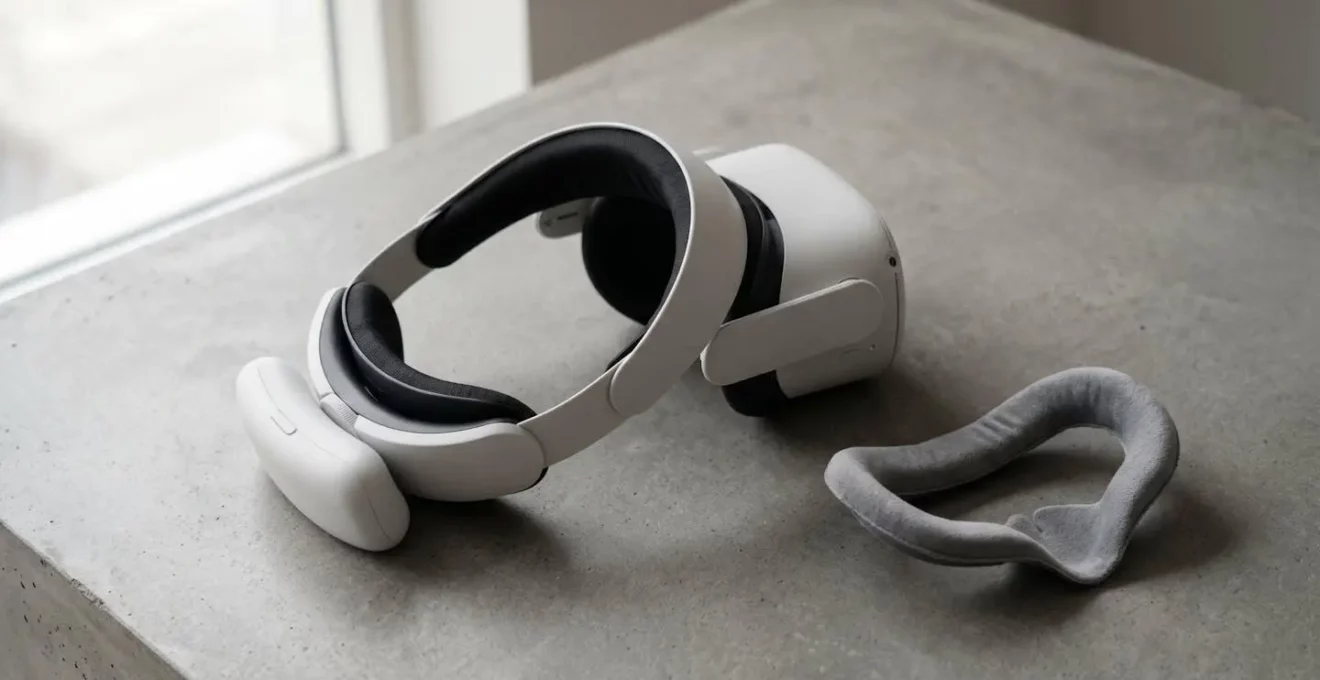
The biggest upgrade to your VR experience isn’t more pixels or faster processors; it’s closing the physical and sensory ‘reality gap’ that causes discomfort and breaks immersion.
- Front-heavy headsets create “ergonomic debt,” causing neck strain and pressure that your brain can’t ignore.
- Motion sickness often stems from a sensory mismatch that can be corrected with simple, non-digital accessories.
Recommendation: Prioritise investing in comfort-focused accessories like a counter-balanced headstrap before upgrading controllers or chasing marginal spec improvements. Your performance and endurance will thank you.
You unbox your new VR headset, dive into a breathtaking world, and for twenty minutes, it’s pure magic. Then, a subtle pressure on your cheeks begins to build. Your neck feels a slight strain. You find yourself constantly readjusting the headset. This is the “20-minute wall” that countless VR users hit, a point where physical reality rudely interrupts the virtual illusion. The common advice is often to “just get an elite strap” or simply “get used to it.”
But what if the problem isn’t the headset’s weight itself, but the subconscious cognitive load it creates? What if the secret to longer, more immersive sessions isn’t just about padding, but about biomechanics and sensory alignment? This guide departs from the simple “what to buy” lists. We’ll explore the ‘why’ behind the ‘what,’ revealing how a thoughtfully chosen £50 accessory can be more impactful than a £150 controller by solving the root cause of VR friction: the reality gap. By focusing on accessories that reduce this disconnect between your body and the virtual world, you don’t just add comfort; you unlock a deeper level of presence and performance.
This article will deconstruct the most common VR pain points—from physical discomfort and motion sickness to perceived controller lag—and show how targeted accessories offer profound solutions. We will analyse how rebalancing weight, managing sensory input, and customising ergonomics are the true keys to transforming a good VR experience into a great one, allowing you to stay immersed for hours, not minutes.
Summary: Unlocking Deeper VR Immersion by Closing the Reality Gap
- Why Does Your Quest 2 Feel Uncomfortable After 20 Minutes of Use?
- How to Use VR Without Scratching Your Glasses or Headset Lenses?
- Official Headstrap or Third-Party: Which Provides Better Value and Comfort?
- The Fan Accessory That Reduces VR Motion Sickness for Sensitive Users
- Which Accessories to Buy First for Fitness, Gaming, and Social VR?
- AR Glasses or VR Headsets: Which Will Dominate UK Living Rooms First?
- Why Do Pro Controllers Advertise Response Times Most Gamers Can’t Perceive?
- Why Does Your £150 Controller Feel Less Responsive Than the Standard One?
Why Does Your Quest 2 Feel Uncomfortable After 20 Minutes of Use?
The standard VR headset, like the popular Quest 2, is a marvel of technology packed into a compact form. However, its default design creates a fundamental ergonomic problem: it’s front-heavy. All the processing power, batteries, and optics are loaded at the front, creating a constant cantilever effect on your face and neck. This isn’t just about weight; it’s about weight distribution. The default strap primarily works by clamping this weight to your face, leading to pressure points, skin irritation, and neck strain—a phenomenon we can call ergonomic debt.
This isn’t a matter of opinion; it’s physics. With a weight of over 500 grams concentrated at the front, your body is in a constant, low-level battle to counteract this imbalance. As VR Comfort Research points out, this physical strain has a direct impact on your session length and enjoyment. As they state, “How weight is distributed across your face, skull, and neck—combined with strap design and fit—determines whether you finish a marathon session energized or logging off early with a sore neck and pressure marks.”
An upgraded headstrap, particularly a “halo” or counter-balanced design, doesn’t just add padding. Its primary function is to redistribute this weight from your sensitive facial areas to the more robust structures of your skull. By shifting the centre of gravity, it drastically reduces the cognitive load your brain expends just to manage the discomfort. The result is that the headset “disappears,” allowing for true immersion. This is why a £50 strap can feel like a 10x upgrade: it solves the most fundamental physical barrier to long-term presence in VR.
How to Use VR Without Scratching Your Glasses or Headset Lenses?
For millions of glasses-wearers, the prospect of VR comes with a significant fear: scratching the expensive, irreplaceable headset lenses with their own prescription glasses. The standard “glasses spacer” included with many headsets is a crude solution at best. It pushes the entire optical assembly further from your face, which can reduce your field of view (FOV), increase peripheral light leakage, and often still doesn’t provide enough clearance for larger frames, creating a constant, immersion-breaking worry.
The elegant solution to this problem is a set of bespoke prescription lens inserts. These are custom-made lenses that snap directly onto the VR headset’s own lens mounts. This simple accessory addresses multiple problems at once. First and foremost, it completely eliminates the risk of scratches, as your glasses are no longer inside the headset. But the benefits extend far beyond simple protection. By placing the corrective optics directly in the headset, you can bring the display as close to your eyes as a non-glasses wearer would.
This proximity is key to immersion. According to optical research for VR users, this method maximizes your field of view and virtually eliminates the distracting light leakage that often creeps in around the edges of a glasses spacer. You’re not just seeing more of the virtual world; you’re seeing it without the physical reminder of a pair of glasses being pressed against your face. It’s a prime example of an accessory closing the reality gap, removing a physical barrier to make the virtual experience feel more seamless and natural.
Official Headstrap or Third-Party: Which Provides Better Value and Comfort?
Once you decide to upgrade from the default strap, you face a key decision: stick with the officially licensed accessory (like Meta’s Elite Strap) or venture into the vast market of third-party alternatives? The choice isn’t just about brand loyalty; it’s a strategic decision about value, innovation, and tailored comfort. The official option offers a clear advantage: guaranteed compatibility and a baseline level of quality. You know it will fit perfectly and has passed the manufacturer’s own standards. It’s the safe, reliable choice for a noticeable, if sometimes incremental, improvement.
However, the third-party market is where true ergonomic innovation thrives. Companies not bound by the original manufacturer’s design constraints have developed a wide array of solutions, most notably the “halo” strap design. Unlike the clamping “elite” style, a halo strap rests a band on your forehead, suspending the headset in front of your eyes. This dramatically reduces pressure on the cheeks and sinuses, a common complaint with other designs. Many third-party straps also integrate built-in battery packs as a counterweight, simultaneously extending your playtime and perfecting the headset’s balance.
So, which provides better value? It depends on your primary pain point. If the default strap is simply a bit loose, the official Elite Strap may suffice. But if you suffer from facial pressure and want the best possible weight distribution and extended battery life in one package, a well-regarded third-party halo strap often provides a far superior comfort-to-cost ratio. Value in VR accessories isn’t just the price tag; it’s the degree to which an accessory solves your specific ergonomic problem. Researching reviews from the VR community is crucial here to find the third-party models that consistently deliver on their promises of superior comfort.
The Fan Accessory That Reduces VR Motion Sickness for Sensitive Users
VR motion sickness, or “simulation sickness,” is a significant barrier for many new users. It occurs when your eyes tell your brain you’re moving, but your inner ear—your body’s balance and motion-sensing system—reports that you are stationary. This sensory conflict can quickly lead to nausea, dizziness, and headaches. While some people adapt over time, others find it persistently ruins their experience. The solution, surprisingly, might not be a pill or a patch, but a simple fan.
A small, often headset-mounted fan accessory tackles this problem by re-introducing a missing piece of sensory information: airflow. When you move in the real world, you feel the air move across your skin. By replicating this sensation in VR, the fan provides your brain with a congruent physical signal that matches the visual input of motion. This helps to resolve the sensory conflict. It’s a brilliant, low-tech solution to a high-tech problem.
A fan can help to avoid motion sickness in VR by simulating real-world wind and reducing the conflicting signals between your eyes and inner ear. When you feel the wind on your face, your brain receives a clear signal that you’re actually moving, reducing the confusion and reducing the risk of motion sickness.
– ScentVR Research Team, How to Use a Fan to Avoid Motion Sickness in VR
The effectiveness of this method is more than just anecdotal. Focused testing with VR users demonstrated a nearly 40% reduction in nausea onset when a fan was used. Beyond motion sickness, a gentle breeze also helps to reduce lens fogging during intense gaming sessions and provides a general cooling effect, further enhancing comfort. This accessory is a perfect example of how a small, inexpensive addition can fundamentally change the playability of VR for sensitive users by creating crucial sensory cohesion.
Which Accessories to Buy First for Fitness, Gaming, and Social VR?
Not all VR activities are created equal, and neither are the accessories that enhance them. Your first accessory purchase should be a strategic one, targeted at solving the biggest friction point in your preferred type of VR experience. Rather than buying randomly, consider your primary use case: are you a fitness enthusiast, an immersive gamer, or a social butterfly? This will guide your priorities and ensure your first £50 is spent where it will have the most impact.
For each activity, the goal is to eliminate the most likely immersion-breaker. For high-movement fitness apps, it’s headset slippage. For deep, narrative games, it’s light leakage and running out of battery. For social VR, it’s the fear of dropping a controller during an animated conversation. Prioritising your accessory purchases based on these specific needs is the most efficient way to enhance your overall experience.
Your VR Accessory Priority Checklist
- For Fitness VR: Your top priority is stability and heat management. A secure halo or elite strap is non-negotiable to prevent headset slippage during rapid movements. Pair this with a sweat-wicking facial interface and consider a VR-specific fan to keep your vision clear and prevent lens fog.
- For Immersive Gaming: The focus here is on uninterrupted presence. A light-blocking facial interface to eliminate all external light is paramount. Your second priority should be an extended battery pack to prevent your adventure from being cut short. Finally, for the best 3D spatial audio, high-quality wired headphones are a significant upgrade over the built-in audio.
- For Social VR: Endurance and expressiveness are key. Controller knuckle straps are essential; they allow you to open your hands for natural gestures without fear of dropping the controllers. A robust battery pack solution is also crucial to ensure your social interactions aren’t limited by a 2-hour playtime.
AR Glasses or VR Headsets: Which Will Dominate UK Living Rooms First?
The tech world often pits Augmented Reality (AR) and Virtual Reality (VR) against each other as competitors for the future of computing. While AR glasses promise to overlay digital information onto our world, current VR headsets have a hidden, decisive advantage for near-term adoption in UK living rooms: a mature and thriving accessory ecosystem. First-generation AR glasses are often expensive, closed-off systems with limited customisation. If the fit is uncomfortable or the battery life is short, the user has little recourse.
VR, on the other hand, has evolved into a highly modular and user-adaptable platform. The discomfort of early VR headsets forced the market to innovate. Today, a user can solve almost any ergonomic issue—be it weight distribution, glasses compatibility, or audio quality—with an affordable, third-party accessory. This customisability makes VR a far more robust and family-friendly platform right now.
The existence of a robust, affordable third-party accessory market for VR proves the platform is mature and user-tested, making a VR headset ‘family-living-room-ready’ in a way that expensive, first-generation AR glasses are not.
– VR Industry Analysis, VR Accessory Ecosystem as Platform Maturity Indicator
This ecosystem is a sign of a platform that has been pressure-tested by a large user base. It demonstrates that the core technology is solid enough for a secondary market to build upon it, solving real-world usability problems. Before AR can dominate the living room, it will need to solve the same ergonomic and comfort challenges that VR has already spent years addressing through its vast accessory market. For now, the ability to tailor a VR headset perfectly to each family member gives it a practical edge over the one-size-fits-none approach of early AR hardware.
Why Do Pro Controllers Advertise Response Times Most Gamers Can’t Perceive?
In the world of competitive gaming, hardware specifications are king. Marketers love to tout incremental improvements in response times, polling rates, and latency, suggesting that a few milliseconds could be the difference between victory and defeat. This is particularly true for “pro” controllers, which often command a premium price for these supposedly superior technical specs. However, there’s a crucial disconnect between what is technically measurable and what is humanly perceptible, especially in the context of VR.
The reality is that for the vast majority of players, the performance gain from a controller with a 3ms response time versus a standard 5ms one is functionally non-existent. Your brain simply cannot process information that quickly. Yet, while you can’t feel those two milliseconds, you can absolutely feel the persistent, nagging discomfort of a poorly balanced headset pressing on your face for an entire gaming session. This is the crucial point that spec-focused marketing misses.
The difference between 5ms and 3ms response time is debatable for most users; the difference between facial pain and balanced comfort in VR is immediately perceptible and affects every minute of gameplay.
– Gaming Ergonomics Research, Tangible vs Imperceptible Gaming Upgrades
This highlights a critical prioritisation error many gamers make. They chase imperceptible technical gains while ignoring the very perceptible, performance-degrading effects of physical discomfort. The cognitive load required to ignore facial pressure or a sore neck directly eats into the mental resources available for reaction time and strategy. Therefore, a £50 headstrap that eliminates this discomfort and allows the headset to “disappear” will have a far greater, more tangible impact on your actual in-game performance than a £150 controller with specs you can’t even perceive.
Key Takeaways
- Physical comfort is not a luxury in VR; it is a direct performance enhancer that reduces cognitive load and allows for deeper immersion.
- Solving the “reality gap”—the mismatch between physical sensations and virtual stimuli—is the primary function of the most effective VR accessories.
- Prioritising accessories that solve tangible problems (discomfort, motion sickness, light leak) provides a far greater return on investment than chasing imperceptible technical specifications.
Why Does Your £150 Controller Feel Less Responsive Than the Standard One?
It’s a frustratingly common scenario: you invest in a premium, “pro-level” controller, expecting lightning-fast responsiveness, only to find it feels… off. It might even feel slower or less accurate than the standard controller it replaced. The issue, most of the time, isn’t a defect in the hardware or its electronic latency. The culprit is your own brain, and the phenomenon is best described as perceived latency caused by unfamiliar ergonomics.
Your brain develops incredibly precise muscle memory based on the weight, shape, and balance of the controllers you use regularly. When you switch to a new controller with a different grip angle or weight distribution, this finely-tuned calibration is broken. Your brain has to work consciously to adapt, and during this recalibration period, your actions can feel clumsy and delayed. This creates the powerful illusion that the controller itself is less responsive.
Case Study: The Ergonomic Impact on Perceived Performance
Research into VR ergonomics consistently shows that physical design directly influences perceived performance. A study referenced by VR comfort specialists demonstrates that when users are handed controllers with unfamiliar weight or grip shapes, their brain requires significant adjustment time to recalibrate muscle memory. This adaptation period creates a false perception of increased latency or reduced responsiveness, even when the electronic signal time remains identical. The brain interprets the physical awkwardness as a hardware flaw. This highlights that for controllers, just as for headsets, comfortable and familiar ergonomics are a prerequisite for the user to perceive the hardware’s true performance capabilities.
This principle is the perfect summary for why a “simple” £50 comfort accessory can be so transformative. By solving tangible physical problems—balancing the headset, removing facial pressure, securing controllers—you are freeing up your brain’s resources. You reduce the cognitive load spent on managing discomfort, which in turn allows you to be more present, react faster, and perform better. True VR enhancement isn’t found in a spec sheet; it’s found in creating a seamless bridge between the physical and virtual worlds.